一. 前提背景
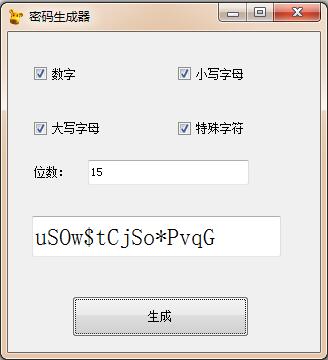
最近由于一个项目的需要,需要生成复杂的密码的,想着太累,就用python做了这个密码生成器,直接上图。
二. 实现的难点
python如果没有QT库的支持,单单用代码来控制界面元素那是相当累人,QT库又很大,安装麻烦。正好找到了一个利用vb生成python界面代码Tkinter开源的库tkinter-designer,相关库地址tkinter-designer 支持大部分控件。
用VB来画界面那是相当的容易哈哈哈。
画好界面后,导出相关的框架代码。
三.实现多线程生成密码
关键代码如下:
# 定义点击使用多线程 生成函数create_password
def do_with_threading(self, pwd_bit = 10, pwd_create_char = '0000'):
    thr = threading.Thread(target = self.create_password(pwd_bit, pwd_create_char))
    thr.start()

# 生成函数 create_password
def create_password(self, pwd_bit, pwd_create_char):
        password_str_0 = '1234567890'
        password_str_1 = 'abcdefghijkmnopqrstuvwsyz'
        password_str_2 = 'ABCDEFGHIJKLMNOPQRSTUVWSYZ'
        password_str_3 = '!@#$%&*?'
        create_list_str = list(pwd_create_char)
        password_str = ''
        for index in range(len(create_list_str)):
            if create_list_str[index] == '1':
                str_index = str(index)
                index_password_str = eval('password_str_' + str_index)
                password_str = password_str + index_password_str
        the_password = ''
        for bit in range(int(pwd_bit)):
            the_password = the_password + random.choice(password_str)
        self.txt_1Var.set(the_password)
        pass

四. 完整代码

#!/usr/bin/env python
#-*- coding:utf-8 -*-

import os, sys, threading, random
import tkMessageBox
if sys.version_info[0] == 2:
    from Tkinter import *
    from tkFont import Font
    from ttk import *
    #Usage:showinfo/warning/error,askquestion/okcancel/yesno/retrycancel
    from tkMessageBox import *
    #Usage:f=tkFileDialog.askopenfilename(initialdir='E:/Python')
    #import tkFileDialog
    #import tkSimpleDialog
else:  #Python 3.x
    from tkinter import *
    from tkinter.font import Font
    from tkinter.ttk import *
    from tkinter.messagebox import *
    #import tkinter.filedialog as tkFileDialog
    #import tkinter.simpledialog as tkSimpleDialog    #askstring()

class Application_ui(Frame):
    #这个类仅实现界面生成功能,具体事件处理代码在子类Application中。
    def __init__(self, master=None):
        Frame.__init__(self, master)
        self.master.title('密码生成器')
        self.master.geometry('312x320+597+241')
        self.createWidgets()

    def createWidgets(self):
        self.top = self.winfo_toplevel()

        self.style = Style()

        self.Text2Var = StringVar(value='15')
        self.Text2 = Entry(self.top, textvariable=self.Text2Var, font=('宋体',9))
        self.Text2.place(relx=0.256, rely=0.4, relwidth=0.516, relheight=0.078)

        self.txt_1Var = StringVar(value='')
        self.txt_1 = Entry(self.top, textvariable=self.txt_1Var, font=('宋体',18))
        self.txt_1.place(relx=0.077, rely=0.575, relwidth=0.798, relheight=0.128)

        self.style.configure('Tbtn_create.TButton', font=('宋体',9))
        self.btn_create = Button(self.top, text='生成', command=self.btn_create_Cmd, style='Tbtn_create.TButton')
        self.btn_create.place(relx=0.205, rely=0.825, relwidth=0.567, relheight=0.128)

        self.chk_4Var = IntVar(value=1)
        self.style.configure('Tchk_4.TCheckbutton', font=('宋体',9))
        self.chk_4 = Checkbutton(self.top, text='特殊字符', variable=self.chk_4Var, style='Tchk_4.TCheckbutton')
        self.chk_4.place(relx=0.538, rely=0.25, relwidth=0.234, relheight=0.103)

        self.chk_3Var = IntVar(value=1)
        self.style.configure('Tchk_3.TCheckbutton', font=('宋体',9))
        self.chk_3 = Checkbutton(self.top, text='大写字母', variable=self.chk_3Var, style='Tchk_3.TCheckbutton')
        self.chk_3.place(relx=0.077, rely=0.25, relwidth=0.234, relheight=0.103)

        self.chk_2Var = IntVar(value=1)
        self.style.configure('Tchk_2.TCheckbutton', font=('宋体',9))
        self.chk_2 = Checkbutton(self.top, text='小写字母', variable=self.chk_2Var, style='Tchk_2.TCheckbutton')
        self.chk_2.place(relx=0.538, rely=0.1, relwidth=0.285, relheight=0.063)

        self.chk_1Var = IntVar(value=1)
        self.style.configure('Tchk_1.TCheckbutton', font=('宋体',9))
        self.chk_1 = Checkbutton(self.top, text='数字', variable=self.chk_1Var, style='Tchk_1.TCheckbutton')
        self.chk_1.place(relx=0.077, rely=0.1, relwidth=0.285, relheight=0.063)

        self.style.configure('Tlab_1.TLabel', anchor='w', font=('宋体',9))
        self.lab_1 = Label(self.top, text='位数:', style='Tlab_1.TLabel')
        self.lab_1.place(relx=0.077, rely=0.4, relwidth=0.157, relheight=0.078)


class Application(Application_ui):
    #这个类实现具体的事件处理回调函数。界面生成代码在Application_ui中。
    def __init__(self, master=None):
        Application_ui.__init__(self, master)
        master.iconbitmap(os.path.dirname(os.path.abspath(__file__))+"\\ico\\dog.ico")

    def btn_create_Cmd(self, event=None):
        #TODO, Please finish the function here!
        self.txt_1Var.set('')
        pwd_bit =  self.Text2Var.get()          #密码位数
        is_number = self.chk_1Var.get()         # 是否包含数字
        is_small_letter = self.chk_2Var.get()   #是否包含小写字母
        is_big_letter = self.chk_3Var.get()     #是否包含大写字母
        is_spe_char = self.chk_4Var.get()       #是否特殊字符
        pwd_create_char = str(is_number) + str(is_small_letter) + str(is_big_letter) + str(is_spe_char)
        if pwd_create_char == '0000':
            tkMessageBox.showinfo( u"软件提示", u'请选择生成规则')
            return
        self.do_with_threading(pwd_bit, pwd_create_char)
        pass

    def do_with_threading(self, pwd_bit = 10, pwd_create_char = '0000'):
        thr = threading.Thread(target = self.create_password(pwd_bit, pwd_create_char))
        thr.start()

    def create_password(self, pwd_bit, pwd_create_char):
        password_str_0 = '1234567890'
        password_str_1 = 'abcdefghijkmnopqrstuvwsyz'
        password_str_2 = 'ABCDEFGHIJKLMNOPQRSTUVWSYZ'
        password_str_3 = '!@#$%&*?'
        create_list_str = list(pwd_create_char)
        password_str = ''
        for index in range(len(create_list_str)):
            if create_list_str[index] == '1':
                str_index = str(index)
                index_password_str = eval('password_str_' + str_index)
                password_str = password_str + index_password_str
        the_password = ''
        for bit in range(int(pwd_bit)):
            the_password = the_password + random.choice(password_str)
        self.txt_1Var.set(the_password)
        pass


if __name__ == "__main__":
    top = Tk()
    Application(top).mainloop()
五. 附件代码下载


